Operating Systems Concepts & Design
Lab 05 - regex with grep, sed, and awk
- Lab Procedure
- regex resources
- Part 1 - grep
- Part 2 - sed
- Part 3 - awk
- Part 4 - Citations & Resources
- Submission
- Rubric
Lab Procedure
Make sure to return to the AWS Learner Lab page (link in Pilot if you forgot to bookmark it) and hit “Start Lab” to turn on your sandbox / AWS instance.
Use ssh to connect to your AWS Ubuntu instance.
Go to the folder that contains your repository (likely named ceg2350-yourgithubusername).
Create a new directory, Lab05.
Create a file named README.md in the Lab05 folder. The Lab 05 Template can be copied from this link:
https://raw.githubusercontent.com/pattonsgirl/CEG2350/refs/heads/main/docs/Labs/Lab05/LabTemplate.md
You may refer to additional resources outside of the recommended resources provided.
Any resource that you use that contributes to your understanding of exercises in this lab should be cited in the Citations section of your lab answers. To add citations, provide the site and a summary of what it assisted you with. If generative AI was used, include which generative AI system was used and what prompt(s) you fed it.
If you make mistakes with commands in the lab, note them! Writing down what went wrong and what the correction was will significantly help your learning journey. If you cannot find a correction, it will help the TAs or myself understand what point you reached and determine some potential solutions.
Frequently Needed Resources
regular expressions
These are useful resources for remembering regex syntax and testing your expressions against smaller cases.
downloading with wget
When downloading files from the internet by their URL, you’ll want to make sure to get the raw file contents - not any additional page wrappers.
wget is a command-line utility for downloading files from the web. With wget, you can download files using HTTP, HTTPS, and FTP protocols. man wget to see the options - we are only going to focus on the URL.
wget [options] [url]
View this page:
https://github.com/pattonsgirl/CEG2350/blob/main/docs/Labs/Lab05/data/tryme.txt
Now view this page (accessible by select Raw on the right side above the file contents):
https://raw.githubusercontent.com/pattonsgirl/CEG2350/refs/heads/main/docs/Labs/Lab05/data/tryme.txt
Run the following two commands:
wget https://github.com/pattonsgirl/CEG2350/blob/main/docs/Labs/Lab05/data/tryme.txt
wget https://raw.githubusercontent.com/pattonsgirl/CEG2350/refs/heads/main/docs/Labs/Lab05/data/tryme.txt
Use cat to view their contents. The second will have only the text file. The first comes with GitHub’s page wrapper. The second - or more importantly - the raw file contents - is what we want.
Part 1 - grep
grep is a handy command to find patterns in text. There are two flags that enable enhanced regular expressions: -E and -P. -E handles most things, but does not work with special regex letter the represent ranges -\w and \d for example. To use these characters for the ranges they represent, use the -P flag instead of the -E flag.
grep [OPTIONS] PATTERN [FILE...]
In access.log you’ll find dummy logs for users (client machines) accessing a web server. Each line contains:
- the client IP
- the access (request) timestamp
- the HTTP Request Method (GET or POST) & resource URL (page)
- the HTTP Status code
Your task is to use both grep and wc to parse the file for information and report on how many instances were found. Your searches with grep should add in enough patterning to reduce mistakes (inaccurate catches).
For example:
- How many logs have a response code of
200?grep -E "200$" access.log- 64 logs had a response code of
200 - response codes are at the end of the line, so
200$would be a good way to create a specific match that would avoid other catches of200
- How many logs use a client IP that starts with
192? - How many logs request page
/faq? - How many logs have a client IP that contains
1(but not exclusively) in the third octet?10.12.1.40-10is in the first octet,12is in the second,1is in the third and40is in the fourth- 21, 12, 11, 210 would all be valid values in third octect
- Check out note below on format of an IP address
- How many logs contain
GETrequests to look for a page that begins withc? - How many logs contains request between 1:20 PM (inclusive) and 1:30 PM (exclusive)?
Resources
IBM - Format of an IPv4 Address
An IPv4 address has the format x.x.x.x, where x is called an octet and must be a decimal value between 0 and 255. Octets are separated by periods - .. An IPv4 address must contain three periods and four octets. The following examples are valid IPv4 addresses:
1.2.3.401.102.103.104
Part 2 - sed
sed is mostly commonly used as a search and replace command. In sedfile.html you’ll find an html file. Your task is to change it into markdown using sed commands. Your converted file should be named sedfile.md.
The following picture shows how sedfile.html (the original) looks compared to sedfile.md after being fixed to use markdown when the files are viewed in GitHub.
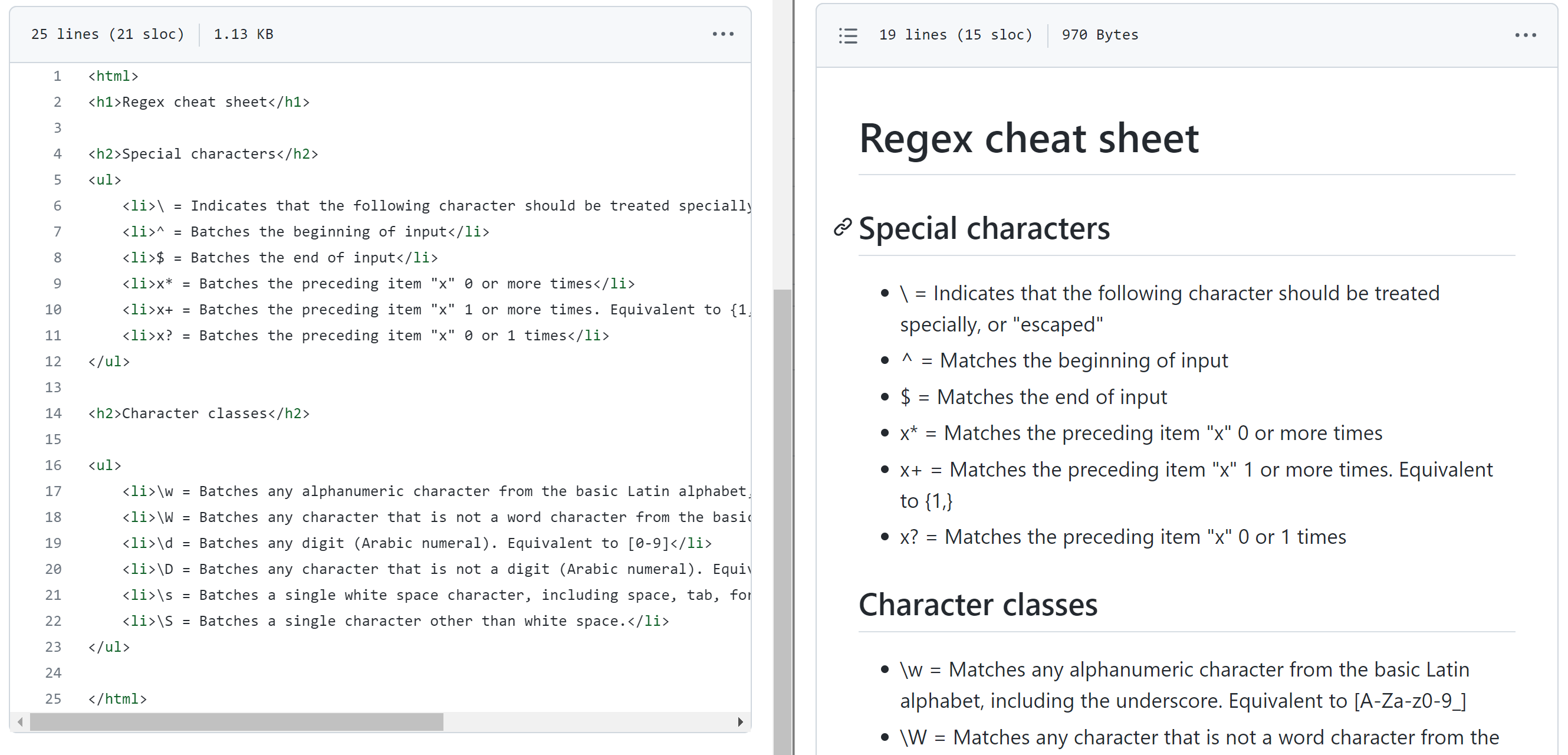
I recommend making a copy of sedfile.html and naming it sedfile.md. Then use sed without modifying the file - once you know your replacement patterns work, then save the changes using sed’s -i flag.
sed -i 's/SEARCH_REGEX/REPLACEMENT/g' INPUTFILE
# -i option tells sed to edit files in place. If an extension is supplied (ex -i.bak), a
# backup of the original file is created otherwise the changes are written back to INPUTFILE
Only write the command that performs the required task in the lab write up. DO NOT paste the results.
- Remove all html end tags - anything with
</stuff>stuffhere represents anything surrounded by the HTML close tag:</ >
- Replace all
<li>tags and the whitespace before the tag with the markdown format for a bullet point:-- Note that is a dash followed by a single space
- Replace
<h1>tags with markdown for header tags:#- Note that is a hashtag followed by a single space
- Replace
<h2>tags with markdown for header tags:##- Note that is TWO hashtags followed by a single space
- Remove the
<ul>tags & remove the<html>tag - Replace the word
Batcheswith the wordMatches
- Resources
- linuxize - use sed to find and replace
Part 3 - awk
awk is a full blown scripting language dedicated to text manipulation. See the resources for more examples, but the general format is:
awk 'program' input-file
In sales.txt you’ll find a file that contains sales records. Your task is to ask some queries and make replacements using awk.
Each lines in sales.txt contains the following fields:
- Date (YYYY-MM-DD)
- Product (String)
- Category (String)
- Quantity Sold (Integer)
- Unit Price (Float)
- Total Revenue (Quantity Sold × Unit Price)
Only write the command that performs the required task in the lab write up. DO NOT paste the results.
- Print only lines for sales made in February 2024
- Print only the product name of products with a unit price of 100 or more
- Print the product name and quantity sold of products with
TVin the product name - Sum the total revenue of products with
Kitchenin the Category name - Replace all occurrences of the word
SofawithCouch. Save the change toupdates-sales.txt
- Resources
- linuxize - awk with examples
- How to Geek - 6 Text Filtering Uses for the Linux awk Command
- cyberbiz - awk find and replace
Part 4 - Citations / Resources
Any resource that you use that contributes to your understanding of exercises in this lab should be cited in the Citations / Resources section of your lab answers. You may refer to your own notes (if they are digitized into GitHub), course notes, or external resources / websites.
To add citations / resources, provide the reference / link and a summary of what it assisted you with.
If generative AI was used, include which generative AI system was used, what prompt(s) you fed it, and a summary of what it assisted you with.
We expect a minimum of one citation / useful resource per part of your lab. So this lab would require a resource for:
- regular expressions
- grep
- sed
- awk
Submission
-
Verify that your GitHub repo has a
Lab05folder with at minimum:access.logsedfile.htmlsedfile.mdsales.txtupdated-sales.txtREADME.md
-
Note that if your command answers in the answer template did not make use of the backtick (`), the TAs are allowed to refuse to grade your submission. Cleanliness and readability is your responsibility.
-
In the Pilot Dropbox, paste the URL to the
Lab05folder in your GitHub repo- URL should look like: https://github.com/WSU-kduncan/ceg2350-YOURGITHUBUSERNAME/tree/main/Lab05
Rubric
Your files should be cleanly presented in your GitHub repository. Citations should be included as needed. Include which generative AI system was used and what prompts were used if generative AI was used.